Creating SVG filters for fun and profit
How a lazy Sunday turned the GDPR cards on Temporal.ist into sand that blows away, and everything I learned about feTurbulence, feDisplacementMap, and making browsers cry on mobile.

Last Sunday I had no roadmap items I wanted to touch, a fresh pot of coffee, and a landing page that felt just a little too well-behaved.
Some context: I build Temporal.ist, an automatic time tracker. It watches file saves and visited URLs and builds your timesheet for you: no timers, no screenshots, and your tracked hours roll straight into invoices. The whole brand is, unavoidably, about the passage of time. Earlier that week I had already replaced the hero background with a canvas sandstorm: grains of teal sand rolling across the page in waves, like an hourglass tipped on its side. I was in a sand mood.

So the Sunday question became: what else on the landing page deserves to be sand?
Scrolling down, I hit the GDPR section, six cards explaining how we handle your data: EU data residency, export everything, delete everything, and so on. And there it was, the joke writing itself:
What if clicking "Delete everything" made the card literally disintegrate into sand and blow off the screen?
Your data can leave. The guarantee stays. Perfect. Let's build it.
This is where we're headed. The finished effect, on the live page:

SVG filters: the best rendering engine you're not using
If you haven't played with SVG filters, here's the pitch: there is a full node-based compositing graph (the kind of thing you'd find in After Effects) sitting inside every browser, addressable from CSS with one line:
.card {
  filter: url(#my-filter);
}
That #my-filter points at an SVG <filter> element, which is a little pipeline of primitives. Each primitive takes an input image (the element's own rendered pixels, or the output of a previous primitive), transforms it, and passes it on. The ones doing the heavy lifting in the sand effect:
feTurbulence: generates Perlin-style noise. Free procedural texture, seeded and tileable.feDisplacementMap: shoves each pixel of its input around, using a second input (the noise) as the map. This is the workhorse of every heat-haze, water-ripple, and disintegration effect on the web.feGaussianBlur: you know this one, but did you knowstdDeviationtakes two values?stdDeviation="30 0"blurs horizontally only. Remember that; it becomes the star later.feColorMatrix+feComponentTransfer+feComposite: the supporting cast that turns noise into an alpha mask and applies it.
Here's the core "turn these pixels into sand" chain, straight from the final code:
<filter id="sand" x="-80%" y="-70%" width="260%" height="240%"
        color-interpolation-filters="sRGB">
  <!-- 1. the wind-stretch: horizontal-only blur, animated 4 → 30 -->
  <feGaussianBlur in="SourceGraphic" stdDeviation="0 0" result="stretch"/>

  <!-- 2. turbulent flutter: low x-frequency, high y-frequency, so the
       displacement smears sideways like wind, not static like TV noise -->
  <feTurbulence type="fractalNoise" baseFrequency="0.008 0.11"
                numOctaves="2" seed="42" result="wind"/>
  <feDisplacementMap in="stretch" in2="wind" scale="0"
                     xChannelSelector="R" yChannelSelector="G"
                     result="smeared"/>

  <!-- 3. the grains: a second noise, elongated horizontally, thresholded
       into an alpha mask that erodes the smear into filaments -->
  <feTurbulence type="fractalNoise" baseFrequency="0.14 0.85"
                numOctaves="2" seed="7" result="grain"/>
  <feColorMatrix in="grain" type="matrix"
                 values="0 0 0 0 0  0 0 0 0 0  0 0 0 0 0  1 0 0 0 0"
                 result="grain-a"/>
  <feComponentTransfer in="grain-a" result="mask">
    <feFuncA type="linear" slope="5" intercept="1"/>
  </feComponentTransfer>
  <feComposite in="smeared" in2="mask" operator="in"/>
</filter>
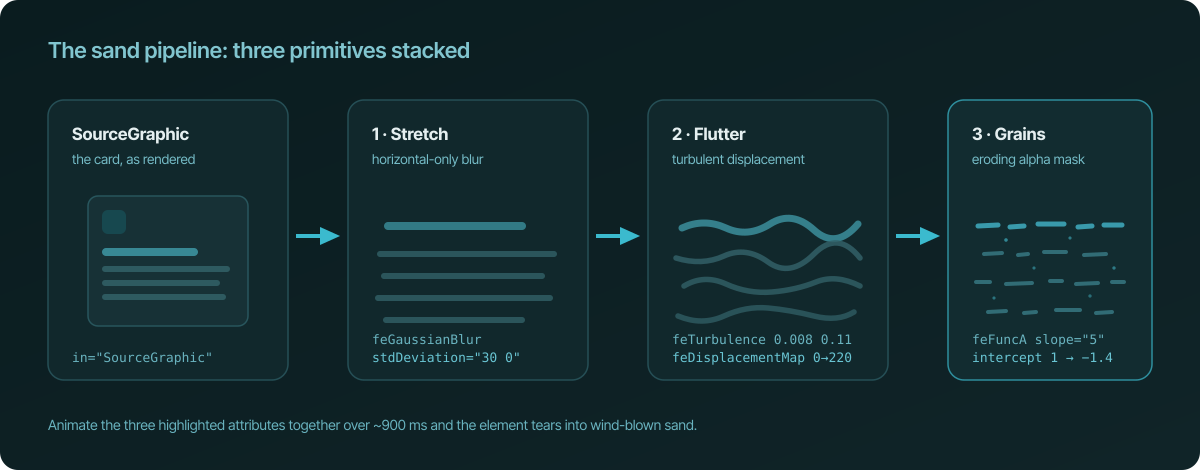
Three ideas stacked on top of each other:
- Stretch. The horizontal-only blur smears the card's pixels sideways. This is what reads as "carried by wind"; without it you get a dissolve, not a gust.
- Flutter. The displacement map is fed anisotropic noise: nearly flat horizontally (
0.008), busy vertically (0.11). Displaced pixels form long horizontal ribbons instead of random static. - Grains. A second, finer noise becomes an alpha mask via
feComponentTransfer. The trick is animatinginterceptdownward each frame:alpha' = alpha × 5 + intercept. As the intercept sinks, only the brightest noise pixels keep alpha, and the smear crumbles into individual filament-shaped grains: sand, not fog.
Animate stdDeviation, scale, and intercept together over ~900 ms from JavaScript (element.setAttribute in a requestAnimationFrame loop; SVG filter attributes are live) and a solid DOM element tears apart into sand mid-air.
Getting to the final effect, one wrong version at a time
None of this arrived fully formed. The fun part of the Sunday was the iteration, so here's the honest changelog.
Version 1: the card flies away in one piece. Slap the filter on the card, animate displacement and erosion, translate the whole element off-screen. It looked… fine? Like a card melting while someone drags it. The problem: a real object doesn't leave all at once. Sand peels.
Version 2: strips. The card itself never moves. Instead, a soft mask front sweeps across it, and as the front passes each band, a clone of the card (absolutely positioned exactly on top, masked to just that band, wearing its own copy of the filter) tears off and flies. Each strip gets random speed, lift, and wobble. Suddenly the card sheds: the first bands are far downwind while the last ones are still intact. This is the architecture that survived to the end: the original element is only ever masked, never filtered, so the not-yet-eaten part stays pixel-perfect.
Version 3: the reference. I wanted the specific look from those "wind turned me into sand" VFX videos, where each part of the subject visibly stretches before it snaps into particles. That's when stdDeviation="x 0" entered the chat, and the grain noise flipped to horizontally-elongated (0.14 0.85) so the debris reads as wind-drawn filaments.
Version 4: the diagonal, and the curve. A straight vertical erosion front looks like a wipe transition. Tilting the sweep to 135° (top-left corner to bottom-right, ±6° random lean per click) made it read as weather. But the front was still a linear-gradient mask: a perfectly straight line, and nature doesn't do straight lines.
Here's the problem: CSS gradients cannot curve. The fix I'm most pleased with: bake a randomized wavy edge (three layered sine waves, with new amplitude, frequency and phase every click) into an SVG <path>, blur it for feather, and use that as the mask-image. Then, each frame, don't regenerate anything: just slide the mask with mask-position along the sweep axis. A ragged, curving, feathered erosion front, animated at almost zero per-frame cost.
const wiggle = (s: number) =>
  amp * (0.55 * Math.sin(s * k1 + ph1) +
         0.30 * Math.sin(s * k2 + ph2) +
         0.15 * Math.sin(s * k3 + ph3));
Version 5: sync. With a wildly curved front, a new bug: the card vanished along the curve, but the sand launched from straight bands, with grains appearing where nothing was disappearing. The fix is my favorite CSS trick of the day: give every strip two mask layers, intersected. Layer one is the inverse of the very same curved mask (only the eaten side shows), sliding in lockstep with the card's own mask. Layer two is the strip's band.
mask-image: url("data:image/png;base64,…"), linear-gradient(141deg, …);
mask-composite: intersect;          /* -webkit-mask-composite: source-in */
Now a strip can only ever show the part of its band the front has actually consumed. The sand is the exact geometric complement of the card. When a bulge of the curve bites in, that region's pixels appear as grains at the bite and stream away. Deeply satisfying.
The "profit" part nobody warns you about: mobile
I tried it on my phone. It chugged. Time to profile instead of vibe.
Four lessons, in increasing order of embarrassment:
- SVG filters re-rasterize every frame you touch them. Ten clones × five primitives × oversized filter regions = a mobile GPU quietly filing a resignation letter. Fixes: shrink filter regions to what the displacement actually needs, and on mobile-class devices drop to 5 strips, single-octave noise, and replace the animated blur with a composited
transform: scaleX(), which gives 90% of the stretch look at roughly 0% of the cost. - Vector masks are rasterized at
mask-size × devicePixelRatio. My oversized curve mask hit ~8000 px on a DPR-3 phone, past texture limits, at which point the mask silently goes blank and your element just… vanishes. Fix: render the curve to a capped-resolution PNG on a canvas, once per click. The feathered edge hides the upscale completely, and it made desktop faster too, because sliding a vector mask was re-rasterizing it every frame. - Off-screen flights grow the page. The flying strips extended the document's scrollable area, and on mobile that resizes the layout viewport mid-animation, and the whole page lurches. Fix: the strips live inside a full-page overlay with
overflow: clip, so the sand exits at the screen edge and the page never learns about it. - A loading
mask-imagehides the entire element. Assign a mask URL that hasn't decoded yet and your element blinks out until it has. Pre-decode withimg.decode()before applying. One line, one very confusing bug.
After all four: median frame time went from 83 ms to 16.7 ms (vsync-locked 60 fps) under 6× CPU throttling. The gimmick earned its place.
Was it worth a Sunday?
Obviously not, and absolutely yes.
Nobody signs up for a time tracker because a GDPR card disintegrates. But people do remember products that feel made by someone who was having fun. And every technique here (turbulent displacement, sliding baked masks, intersected mask layers, the mobile survival kit) is now sitting in a small reusable Svelte action I'll reach for again.
If you want to see it live: go to temporal.ist, scroll to the "Your data, on your terms" section, and click a card. Click "Delete everything" specifically. It's a better privacy policy than most privacy policies.
And if you're the kind of person who bills by the hour and would rather your timesheet wrote itself while you play with SVG filters on a Sunday: that's literally what Temporal.ist does. It tracks the files you save and the sites you work in, keeps the hours honest, and turns them into invoices. It's free during early access.
The sand, however, is free forever.
Sander is the founder of Temporal.ist, automatic time tracking for people who forget timers exist. More engineering write-ups on the blog. Questions about the effect? The data practices behind those GDPR cards are documented at temporal.ist/privacy, and yes, you really can delete everything.