
ActivityWatch alternative · 2026
The ActivityWatch alternative for people who bill for their time
ActivityWatch records every window on one machine and keeps it there. Temporal.ist records only the project folders and sites you choose, follows you across devices, and turns the hours into reports and invoices — no screenshots, ever.
- No screenshots, ever
- No keystroke logging
- EU data residency
- Export or delete any time
- 13:58 Firefox Slack | #general — DMI workspace
- 14:02 Code invoices.py — dmi-site
- 14:11 Firefox Django migrations explained — YouTube
- 14:19 Spotify Lo-fi beats to focus to
- 14:26 Code invoices.py — dmi-site
- 14:40 afk not-afk → afk
Everything, all day. Stored locally; sorted into categories by regex rules you write.
- 14:02 ~/code/dmi-site/api/invoices.py saved
- 14:07 github.com/dmi/site/pull/214 url match
- 14:26 ~/code/dmi-site/api/invoices.py saved
- 14:41 No saves for 15 min — session closed idle
Only the folders and sites you chose — filed under the project, ready to invoice.
Why people go looking for an ActivityWatch alternative
ActivityWatch is genuinely good at "where did my day go?", and it does it locally. The search for an alternative usually starts when the question changes.
One machine, one database
Your desktop knows Tuesday, your laptop knows Wednesday. Syncing devices is still a rough prototype; the docs point you at Syncthing and a manual setup.
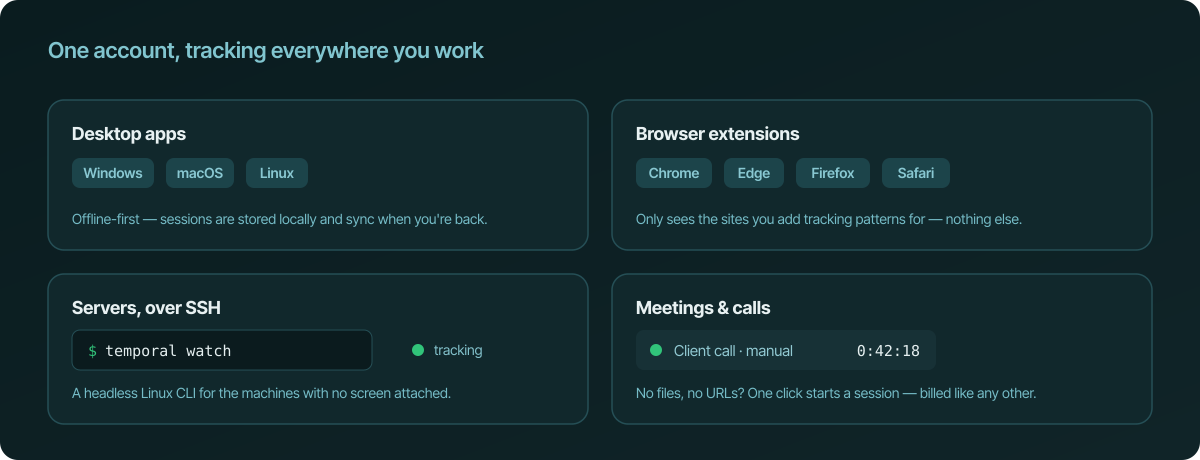
Temporal.ist insteadOne account. Desktop apps for Windows, macOS and Linux, browser extensions, a CLI for servers — sessions sync when you are online and queue when you are not.
It knows apps, not projects
ActivityWatch records the window title. Turning "invoices.py — dmi-site" into client work means writing regex categorisation rules, and keeping them working as titles change.
Temporal.ist insteadYou point a folder or a URL pattern at a project once. Every save and every matching page visit files itself. No rules to maintain.
There is nothing to bill from
No clients, no rates, no invoices. Billing means exporting, cleaning the data in a spreadsheet and typing it into an invoicing tool — the timesheet you wanted to stop writing.
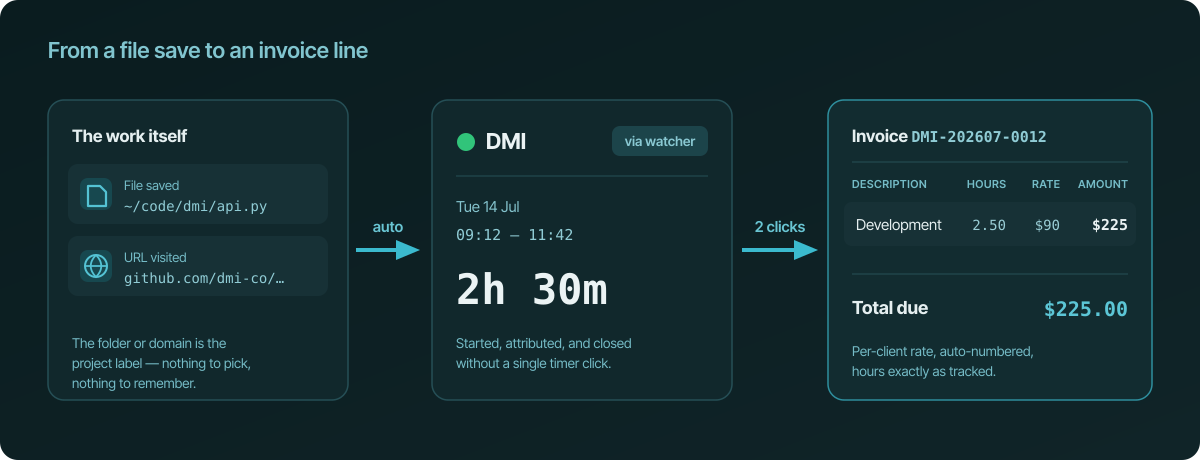
Temporal.ist insteadProjects belong to clients with hourly rates. Unbilled sessions become line items on an auto-numbered invoice in two clicks, with the sessions as evidence.
A dashboard for you alone
ActivityWatch is single-user by design. There are no shared projects, no team totals, nothing a colleague or a client can look at.
Temporal.ist insteadOrganisation and team roll-ups, a live "who is on what" board, per-project totals — and a manager still never sees a screenshot or a keystroke.
It records everything
Every window title, all day: chats, videos, bank tabs, the lot. Local, yes — but still a complete log of your life to store, back up and secure.
Temporal.ist insteadTemporal.ist only watches the folders and URL patterns you chose, and the server receives even less: timestamps, paths inside those folders and session times. URLs stay in the browser extension.
Feature-by-feature
| Feature | Temporal.ist | ActivityWatch |
|---|---|---|
Open source They win | No — proprietary; opening parts of the stack is on the roadmap | Yes, fully (MPL-2.0) |
Runs without a server They win | No — sessions sync to EU servers (desktop client is offline-first) | Yes, 100% local |
What it captures Tie | Timestamps and paths of files inside folders you chose. For sites, only when a session starts and stops — matched URLs never leave the browser extension | Active app and window title, all day; browser URLs via extension |
Projects and clients We win | Built in — folders and URL patterns map to projects, projects to clients | Categories via regex rules you write |
Invoicing We win | Built in: per-client rates, auto-numbered invoices from unbilled sessions | None |
Several devices We win | One account, sessions merge automatically | Prototype; manual sync via Syncthing |
Teams We win | Organisation and team roll-ups, live dashboard, no surveillance | Single user |
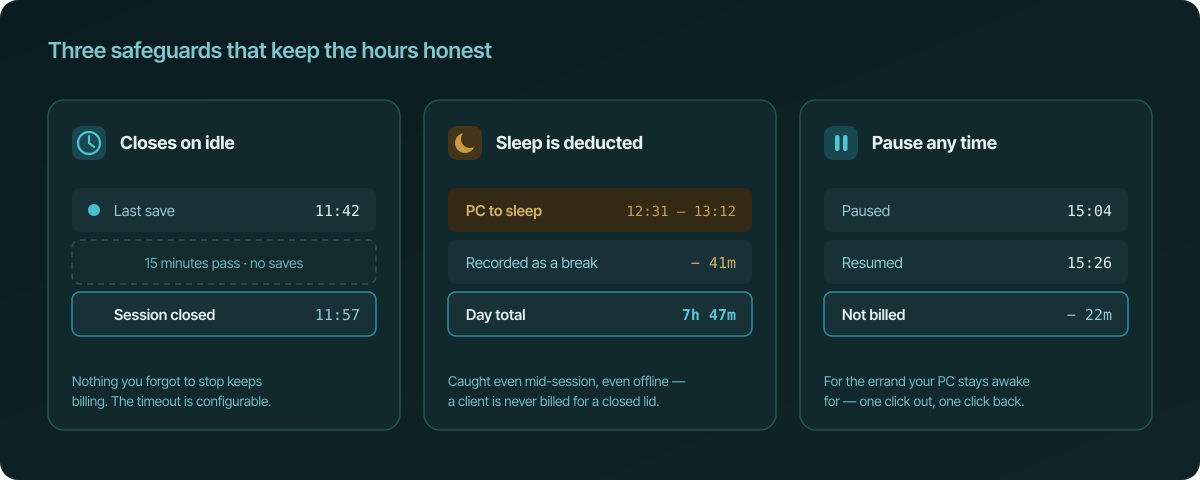
Idle handling Tie | Session closes after 15 idle minutes; PC sleep deducted | AFK watcher marks idle time |
Timeline of your day Tie | Per-project sessions on a calendar — only the time that belongs to each project and client, linked automatically | Minute-by-minute timeline of every app and window |
Mobile They win | No app; the web dashboard works on a phone | Android app (no iOS) |
AI assistants We win | MCP server — log, fix and report time from Claude, ChatGPT and others (Pro) | None |
Platforms Tie | Windows, macOS, Linux, Linux CLI over SSH; Chrome, Edge, Firefox, Safari | Windows, macOS, Linux, Android; browser extensions |
Price Tie | Free Solo plan, no card; Pro €8/mo; Team €6/user/mo | Free forever (donations welcome) |
The honest trade: what leaves your machine
ActivityWatch sends nothing anywhere. Temporal.ist runs a server, in the EU, because several devices, teams and invoices need one. Here is the complete list of what that server ever receives.
Sent to Temporal.ist
Never captured, on any plan
Everything is exportable and deletable from settings, no exit interview. Details in the privacy-first tracking guide and the privacy policy.
Switch in three minutes — or run both
There is no importer, and you will not miss it: the record rebuilds itself from real activity.
-
Create a free account
No credit card. The Solo plan is free; nothing expires after a trial.
-
Install the watcher where you work
Desktop app for Windows, macOS or Linux; browser extension for Chrome, Edge, Firefox or Safari; a headless CLI for servers over SSH.
-
Point folders and sites at projects
One folder or URL pattern per project. From here on saves and visits file themselves; sessions close after 15 idle minutes on their own.
-
Keep ActivityWatch if you like
They watch different things and never conflict. Your ActivityWatch history stays yours — export it for your archive; Temporal.ist rebuilds a defensible timesheet from real activity within a week.
What you get when you switch
Not a promise list — this is what is in the box today.
Tracking that starts itself
A file save or a visited URL starts the session and files it under the right project. No timers, no screenshots, no activity scores.
Invoices from tracked time
Projects link to clients with per-client hourly rates. Unbilled sessions become line items on auto-numbered invoices — nothing re-typed.
Hours that stay honest
Sessions close by themselves after 15 idle minutes, time your PC spends asleep is deducted automatically, and you can pause with one click.
Sessions or whole days
Think in days, not sessions? Optional day-span mode shows one session per project per day, first save to last — reversible, and applies to your whole history.
Everywhere you work
Apps for Windows, macOS, and Linux, a headless CLI for servers over SSH, and extensions for Chrome, Edge, Firefox, and Safari. Offline-first, syncs later.
Teams without surveillance
Organisation and team roll-ups with a live dashboard. Managers see project totals — never screenshots or keystroke records.
ActivityWatch alternatives compared
Temporal.ist That's us
Free during early accessAutomatic tracking from file edits and URLs with invoicing built in — idle time and PC sleep deducted on their own, offline-first desktop apps plus a headless Linux CLI. No screenshots.
Best for: Freelancers and small teams who forget timers and bill hourly.
RescueTime
Free; Premium ≈ $12/moPersonal productivity coach with focus blocking and weekly summaries.
Best for: Individuals trying to build focus habits.
Timing
$12–$15/mo or one-time licence ≈ $129Mature macOS-only automatic tracker with rich app categorisation.
Best for: Solo Mac freelancers who don't need teams or invoicing.
Memtime
From ≈ €11/moVisual day-timeline tracker (Mac/Win/Linux) with strong professional-services traction.
Best for: Teams that want a horizontal timeline reconstruction of the day.
Rize
≈ $9.99/moBeautifully designed macOS focus app with timesheet exports.
Best for: Mac-only individuals who want a focus coach.
WakaTime
Free; Premium ≈ $9–$59/moIDE-based developer time tracking with language and per-file breakdown.
Best for: Solo devs who want coding analytics, not invoices.
Toggl Track
Free up to 5 users; paid plans from ≈ $9/user/moThe polished manual stopwatch. 100+ integrations and best-in-class team reporting.
Best for: Teams that reliably hit start/stop and depend on integrations.
When to choose which
Choose Temporal.ist
You bill clients by the hour and want the invoice to write itself. You work on more than one machine, or on a server over SSH. You have teammates and need project totals without watching anyone. You want to log, fix and report time by talking to an AI assistant.
Choose ActivityWatch
You will only run software you can audit end to end, and a server you do not control is a hard no. You want an app-usage timeline of your whole day rather than project hours. You do not bill anyone — you just want to know where the day went.





Frequently asked questions
Is Temporal.ist a drop-in replacement for ActivityWatch?
No, and it doesn't try to be. ActivityWatch answers "which apps and windows did I use today?". Temporal.ist answers "how long did I work on each project, and what can I invoice?". If you want an app-usage timeline, keep ActivityWatch — many people run both.
Does Temporal.ist send my activity to a server?
Yes. Sessions sync to Temporal.ist's EU servers so multi-device tracking, teams and invoicing work. What is sent: timestamps, the paths of files inside folders you chose to watch, and session data (project, start, end, pauses). URLs never leave the browser: the extension keeps your URL patterns locally and only reports when a session starts and stops. What is never sent or captured: file contents, URLs, screenshots, keystrokes, window titles, or anything outside your watched folders and patterns.
Is Temporal.ist open source?
Not fully. The backend and desktop client are proprietary; the browser extensions are the first part planned to be published under an open licence. If you will only run software you can audit end to end, ActivityWatch remains the better choice.
Can I self-host Temporal.ist?
There is no supported self-hosted edition, and none is promised for v1. Temporal.ist is hosted in the EU with GDPR export and deletion built in. If a server you don't control is a hard no, stay on ActivityWatch.
Can I import my ActivityWatch history?
There is no importer. Export your ActivityWatch data for your own archive; Temporal.ist starts recording from real activity the moment you point it at a folder, and within a week you have a timesheet built from evidence rather than reconstruction. Past work can be added as manual sessions.
Can I run ActivityWatch and Temporal.ist at the same time?
Yes. They watch different things — ActivityWatch the active window, Temporal.ist file saves in chosen folders (and, inside the browser extension, visits to sites matching your patterns) — and never interfere. A common setup is ActivityWatch for personal app-usage insight and Temporal.ist for billable project time.
What does Temporal.ist cost compared with ActivityWatch?
ActivityWatch is free forever. Temporal.ist has a free Solo plan with no credit card (unlimited folders and URL patterns, 30-day history, weekly reports). Pro is €8 per month and adds unlimited history, invoicing, exports and calendar sync; Team is €6 per user per month for shared projects and organisation roll-ups.
Does Temporal.ist take screenshots or score productivity?
Never, on any plan. There is no screen capture, no keystroke logging and no activity or productivity score. On team plans a manager sees hours per project — nothing else.
Does it work on Linux, and on servers over SSH?
Yes. There are desktop apps for Linux, macOS and Windows, browser extensions for Chrome, Edge, Firefox and Safari, and a headless Linux CLI that tracks work on a remote machine over SSH. There is no mobile app; the web dashboard works on a phone.
Keep the honesty. Add the invoice.
Automatic tracking from the folders and sites you choose, on every machine you work on, with the invoice written from the evidence. No timers, no screenshots, no timesheet Sunday.
Start tracking time, free Free Solo plan · no credit card · ActivityWatch can keep running