
Clockify alternative
The best Clockify alternative in 2026
- Clockify's free tier is hard to beat. We aren't pretending otherwise.
- If you need automatic tracking, Clockify's Auto Tracker is paid-tier only — most alternatives include it.
- If you need invoicing without paying, options are limited.
People leave Clockify when they realise the killer features aren't actually free, or when manual tracking just doesn't survive their workday.
Why people look for a Clockify alternative
- Auto Tracker, invoicing, and time-off are paid-tier — once you upgrade, the price comparison changes.
- Performance has gotten heavier as features have piled up.
- Manual timer discipline is the real bottleneck and the free tier doesn't fix that.
Clockify alternatives compared
Temporal.ist That's us
Free during early accessAutomatic tracking from file edits and URLs with invoicing built in — idle time and PC sleep deducted on their own, offline-first desktop apps plus a headless Linux CLI. No screenshots.
Best for: Freelancers and small teams who forget timers and bill hourly.
Toggl Track
Free up to 5 users; paid plans from ≈ $9/user/moThe polished manual stopwatch. 100+ integrations and best-in-class team reporting.
Best for: Teams that reliably hit start/stop and depend on integrations.
Harvest
≈ $12/user/mo (Pro)Manual timer + mature invoicing with deep QuickBooks/Xero integration.
Best for: Agencies running their billing on QuickBooks/Xero today.
Memtime
From ≈ €11/moVisual day-timeline tracker (Mac/Win/Linux) with strong professional-services traction.
Best for: Teams that want a horizontal timeline reconstruction of the day.
ActivityWatch
Free, open sourceOpen-source, fully local automatic tracker. No SaaS.
Best for: People who'll only run open-source software they can audit.
Timely
≈ $11–$22/user/moAI-summarised timesheet from comprehensive desktop activity capture.
Best for: People who want an AI draft of their week.
Why teams pick Temporal.ist
If you're paying for Clockify Standard or higher, Temporal.ist's automatic-first model is a real upgrade: no timer to start, sessions attributed from the folder or domain you're already working in, an idle timeout and automatic PC-sleep deduction keeping totals honest, and invoicing included rather than tier-gated. It also covers ground Clockify doesn't — offline-first desktop apps and a headless Linux CLI for tracking work on servers. If 'free forever for unlimited users' is non-negotiable for you, Clockify is hard to beat — be honest with yourself before switching.
What you get when you switch
The pitch above, made concrete — this is what's in the box.
Tracking that starts itself
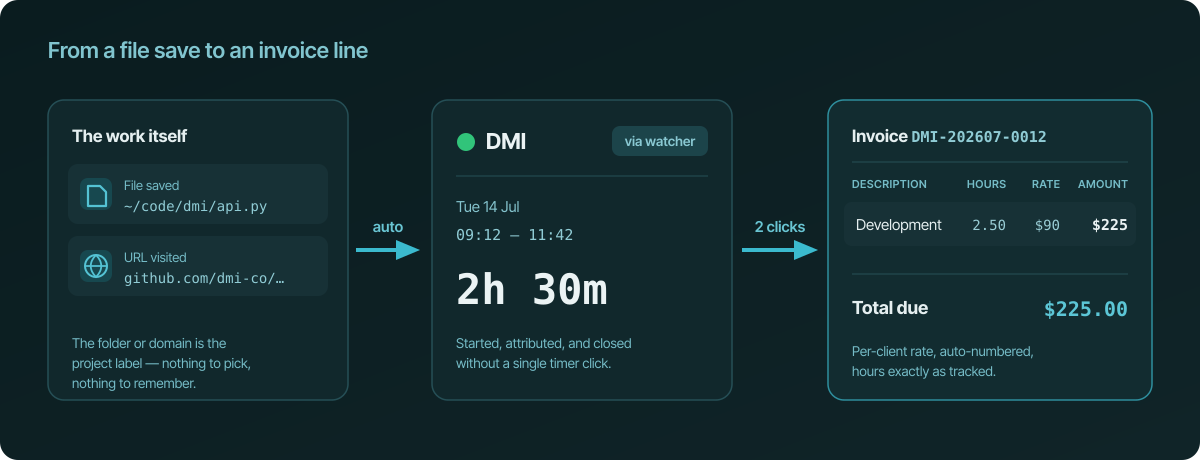
A file save or a visited URL starts the session and files it under the right project. No timers, no screenshots, no activity scores.
Invoices from tracked time
Projects link to clients with per-client hourly rates. Unbilled sessions become line items on auto-numbered invoices — nothing re-typed.
Hours that stay honest
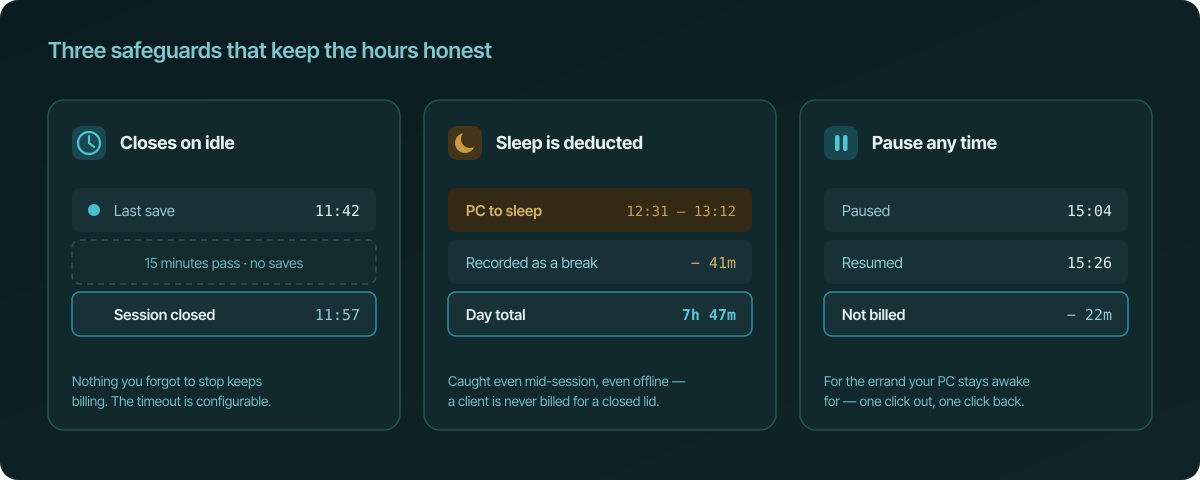
Sessions close by themselves after 15 idle minutes, time your PC spends asleep is deducted automatically, and you can pause with one click.
Sessions or whole days
Think in days, not sessions? Optional day-span mode shows one session per project per day, first save to last — reversible, and applies to your whole history.
Everywhere you work
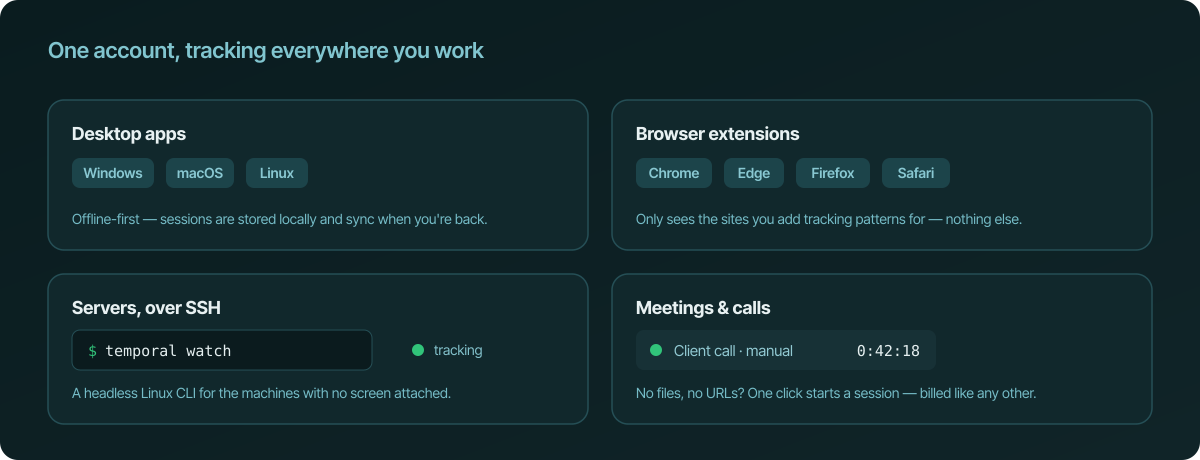
Apps for Windows, macOS, and Linux, a headless CLI for servers over SSH, and extensions for Chrome, Edge, Firefox, and Safari. Offline-first, syncs later.
Teams without surveillance
Organisation and team roll-ups with a live dashboard. Managers see project totals — never screenshots or keystroke records.
Frequently asked questions
Is Temporal.ist also free?
During early access, yes. We haven't published pricing for after that.
What's the most feature-equivalent alternative for free?
ActivityWatch — open source, fully local, free forever. Less polished, more privacy.
Ready to stop reconstructing your week?
Track time automatically. Bill clients in the same tool. No surveillance, ever.
Start tracking time, free