
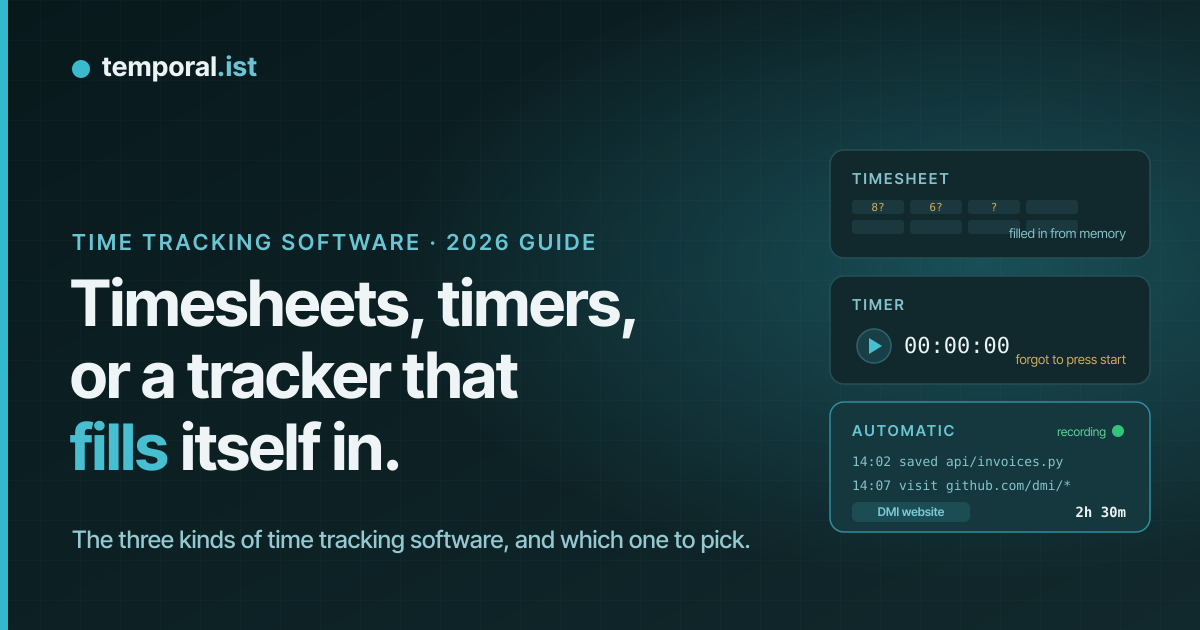
Search for time tracking software and you get a wall of near-identical apps,
each with a stopwatch and a pricing page. The category is older than it
looks, and the differences that matter are not on the feature lists. They
come down to one question: who does the work of remembering?
This guide answers that question. It explains what a time sheet actually is
(and why it is the same thing as a timesheet), sorts every time tracking
tool into one of three kinds, puts a number on what the manual kind costs
you, and ends with a short checklist for picking one, whether you are a
freelancer billing by the hour or a small team that needs to know where the
week went.
What time tracking software is, and what a time sheet is
Time tracking software records how long you spend on work, sorted by
project, client or task, so the hours can be billed, reported or simply
understood. Every variant you will meet is a form of it: hour tracking
software, time logging software, timesheet software, time tracking programs
and time tracking tools all describe the same category with different words.
A time sheet (one word or two, timesheet or time sheet, it makes no
difference) is the oldest form: a grid with days across the top and projects
down the side, where you write the hours in each cell. Timesheet software is
that grid on a screen, with a total at the bottom and an export button. It
is not a separate product category. It is the manual end of time tracking
software.
The word a tool uses for itself matters for one reason: it tells you what
the tool expects of you. A timesheet expects you to fill it in. A timer
expects you to press a button. A tracker that fills itself in expects
nothing, and that is the whole difference.
The three kinds of time tracking programs
Every time tracking tool on the market is one of these three, whatever the
marketing says.
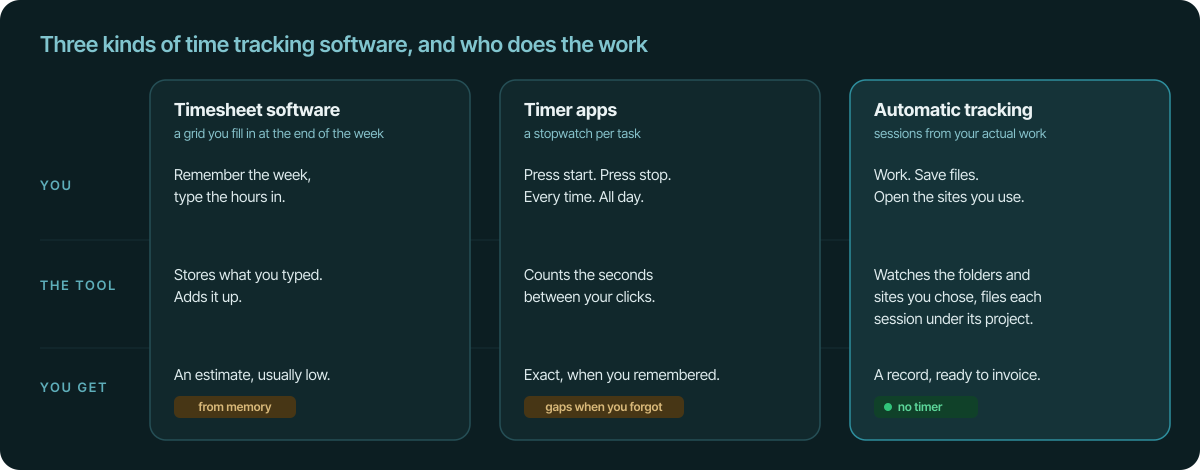
1. Timesheet software: you remember, it stores
Weekly grids, daily forms, the spreadsheet with the SUM formula. You fill it
in, usually at the end of the day or the week, and the tool adds it up,
routes it for approval, and exports it to payroll or an invoice.
What it is good at: it is simple, it fits how most companies already think
about hours, and it needs no installation. For salaried teams that report
time in half-day blocks, a timesheet is fine.
Where it fails: the data comes from memory. By Friday, Tuesday is a blur.
Short tasks, interruptions and the twenty minutes you spent on a client's
"quick question" do not make it onto the sheet. The time you spend filling
it in is unpaid, and the hours you forget are unbilled. There is more on
both costs below.
2. Timer apps: you press start, it counts
The stopwatch model: pick a project, press start, work, press stop. Most
popular time tracking tools are this kind, and they are a genuine
improvement on a timesheet because the clock, not your memory, measures the
duration.
What it is good at: precision, when you use it. A timer knows a task took
47 minutes, not "about an hour".
Where it fails: the timer only knows about work you told it about. Forget
to press start after lunch and the afternoon is gone. Forget to press stop
and you billed a client for your dinner. Switch projects without switching
the timer and the hours land in the wrong place. Timer users spend a
surprising amount of energy on the timer itself, and the record is exactly
as complete as their discipline on a busy day.
3. Automatic time logging software: you work, it records
The third kind watches what you actually do and turns it into time entries.
There are two very different families here, and it pays to know which one
you are looking at.
Monitoring tools record your screen: screenshots at intervals, keystroke
counts, "activity scores", sometimes the webcam. They are built for managers
who want to watch, and they are the reason automatic time tracking has a
bad name with the people being tracked.
Activity-based tools record signals from the work itself. Temporal.ist, for
example, watches the project folders and the sites you choose: a file save
inside a watched folder or a visit to a matching site starts a session under
that project, and the session closes on its own after 15 minutes without
activity. No screenshots, no keystrokes, no scores. The record is a list of
sessions per project, which is what you needed in the first place. (The
difference between the two families is spelled out in
time tracking without screenshots.)
What it is good at: completeness. Nothing depends on remembering. The
tracker was running when you fixed that bug at 23:40, and it was running
during the "quick question".
Where it fails: it can only track what it can see. Work that is not a file
or a site, like a phone call or a whiteboard session, still needs a manual
entry. And the record is only as good as your setup: point it at the wrong
folder and the hours go to the wrong project.
What a timesheet really costs
Two costs hide inside every manual system, and neither shows up on the
pricing page.
The first is the time spent tracking time. Fifteen minutes a day
reconstructing the day, or an hour on Friday rebuilding the week from
calendar entries and commit messages, is unpaid work. Over a year it adds up
to a working week, sometimes two.
The second is bigger. Studies of memory-based time reconstruction put the
gap between hours worked and hours written down at roughly 15 to 25
percent. People do not forget the big blocks. They forget the short ones:
the 20-minute fix before the standup, the email thread that turned into an
hour, the third "small change" of the day. At a freelance rate, those
forgotten hours are real money that was earned and never invoiced.
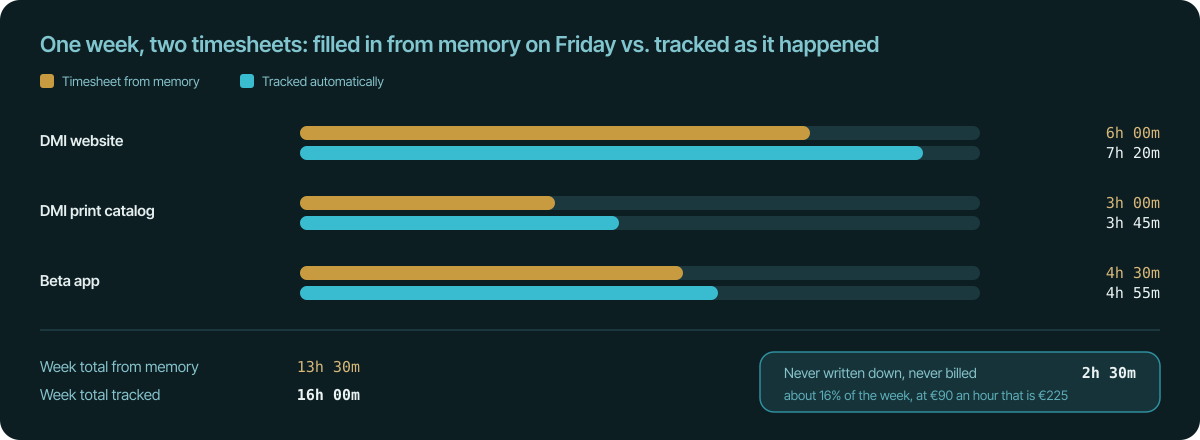
That gap is the argument for automatic tracking in one picture. The tool is
not cheaper because the subscription is cheaper. It is cheaper because it
finds the hours the timesheet loses. If you want your own number, the
billable hours calculator works it out from
your rate.
How to choose time tracking software
The right tool depends on what the hours are for. Work down this list and
most options eliminate themselves.
Who does the remembering? Be honest about your discipline on a busy day.
The answer decides between a timer and an automatic tracker. Timesheets are
only the right pick when someone else requires them.
Do you bill from it? If the hours become invoices, you want projects
linked to clients, rates per client, and an invoice that pulls in unbilled
time by itself. Exporting to a spreadsheet and retyping it into an invoicing
tool is the timesheet problem in a new costume.
Time tracking with invoicing built in covers
what to look for.
Where do you work? Check the platforms you actually use: Windows, macOS,
Linux, the browser, a server over SSH. A tracker that is missing where half
your work happens will produce half a record.
Does it work offline? Trains, planes, a client site with no guest Wi-Fi.
A desktop tool that records locally and syncs later keeps the record intact.
A web-only tool does not.
What does it capture, and who can see it? Read the privacy page, not the
feature list. Screenshots, keystroke logging and activity scores are
surveillance, whatever they are called, and your team will treat them that
way. A tool that records timestamps and the paths of files in folders you
chose is a different thing from one that records your screen.
Privacy-first time tracking lists exactly what
one such tool stores.
Can a team use it without being watched? Team features should mean
shared projects and per-project totals, not a manager's view of everyone's
day. If the pitch to your team is "we can see what you are doing", expect
resistance and workarounds.
Can you get your data out? CSV and PDF exports at minimum, and an API if
you automate anything. Your hours are your business records.
What does it cost, honestly? Compare the subscription against the two
hidden costs above. A free timesheet that loses 16 percent of your billable
hours is the most expensive tool on the list.
Time tracking software for freelancers vs. small teams
Freelancers need the billing loop to be short: track, review, invoice,
done. The features that matter are per-client rates, invoices built from
unbilled sessions, and a record that survives a client asking what the four
hours on the 26th were. Everything else is noise.
Small teams and agencies need the roll-up: hours per person, per project,
per client, in one place, without a spreadsheet merge on Monday morning.
They also need everyone to actually track, which is where surveillance-style
tools fail: people find ways around a tool they resent. Automatic tracking
that only sees chosen folders and sites gets adopted because there is
nothing creepy to reject.
Team time tracking without surveillance goes deeper.
Where Temporal.ist fits
Temporal.ist is the third kind: automatic time logging software built for
people who bill for their time. A desktop app for Windows, macOS and Linux
watches the project folders you pick, browser extensions for Chrome, Edge,
Firefox and Safari watch the sites you pick, and a headless CLI covers work
on servers over SSH. Saves and visits become sessions under the right
project, sessions close after 15 idle minutes, and time your PC spends
asleep is deducted. Projects belong to clients with hourly rates, so
unbilled time becomes an auto-numbered invoice in two clicks. Teams get
organisation and project roll-ups without a single screenshot, and if you
use an AI assistant, you can log, correct and report time by asking it.
The honest limits: there is no mobile app (the web dashboard works on a
phone), work that is not a file or a site is added by hand, and the tracker
is not open source. The Solo plan is free with no credit card. Pro is €8 a
month and Team is €6 per user per month.
Getting started in ten minutes
- Create a free account.
- Install the desktop app, the browser extension, or both.
- Add your projects and point a folder or a URL pattern at each one.
- Work. Check the calendar at the end of the day; every session is editable
if something landed in the wrong place. - On invoice day, open unbilled time and create the invoice.
The timesheet does not disappear. It writes itself.