
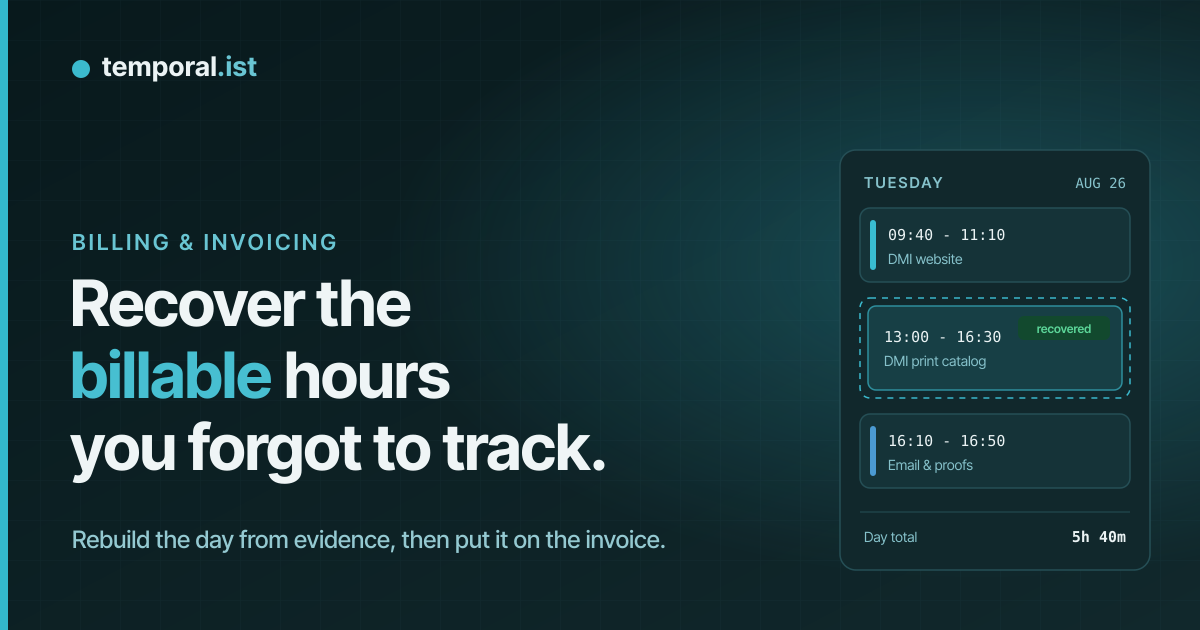
It is invoice day. You open last week, and Tuesday afternoon is a hole.
You know you worked. You can picture the coffee. But nothing was tracked,
the memory has gone soft, and every hour you cannot account for is an hour
you will quietly not bill.
Most people handle this in one of two bad ways. They shrug and eat the
loss, or they write down a number that feels right and hope nobody asks.
There is a better way, and it takes about fifteen minutes: rebuild the day
from evidence, log it properly, and bill it like any other time.
Step 1: stop trying to remember, start looking for evidence
Memory is the worst available source for what you did last Tuesday. It
compresses four focused hours into "a while" and stretches a frustrating
twenty minutes into "most of the afternoon". Fortunately you do not need
it, because almost everything you did left a timestamp somewhere:
- Commit history. If the work lives in version control, the log is a
diary you already wrote. The first and last commit of the afternoon
bracket the block, and the messages tell you what it was about. - The files themselves. Sort the project folder by last modified.
Even without version control, the files you touched that day are
sitting there with times on them. - Browser history. The documentation you read, the supplier PDF you
opened, the staging site you refreshed twelve times. It is all in
there, in order. - Your calendar. Meetings anchor a day. If the DMI print review call
was at 10:00, you know where the morning went. - Sent email and messages. "Proof attached, take a look" at 16:33
tells you exactly when that proof was finished.
Work through these and the shape of the day comes back fast: when you
actually started, where the lunch gap sat, when the last artifact was
touched. Then place work blocks between the anchors.
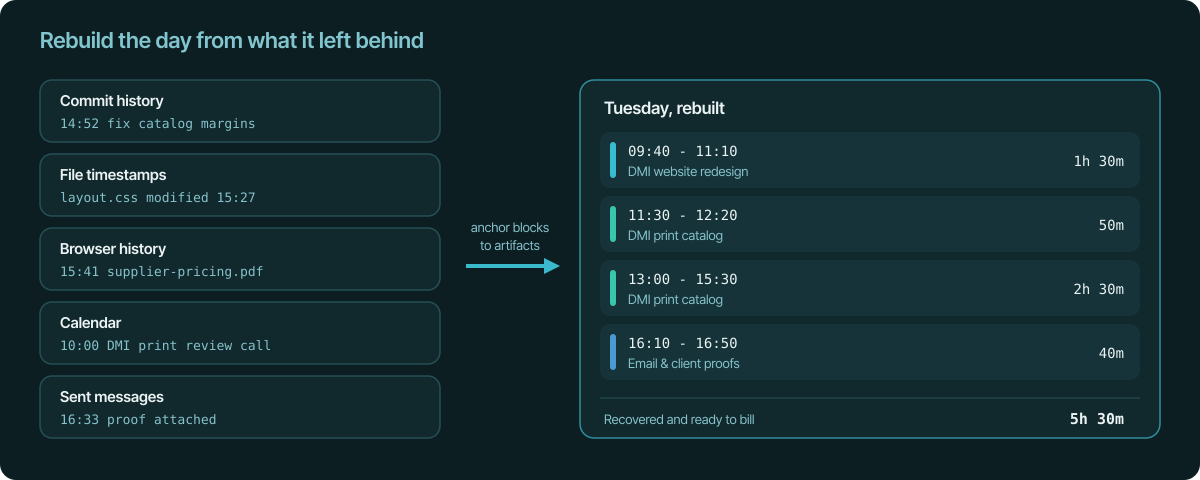
Two rules keep the reconstruction honest. Anchor every block to at least
one artifact, and when a boundary is fuzzy, round in the client's favor.
A rebuilt 5h 30m that you can defend line by line is worth more than a
guessed 7h that you cannot.
Step 2: log it as sessions, not one round blob
The temptation is to write "Tuesday: 8 hours" somewhere and move on.
Resist it. A single blob is exactly the kind of line a client squints at,
and you will not be able to say anything useful about it in three weeks.
Separate blocks with times and a one-line description each read as what
they are: a record.
In Temporal.ist this is a couple of clicks per block. Open the calendar,
go to the day, and click the empty spot where the work belongs. A new
session form opens, already filled in with a block at that hour. Pick the
project, adjust the start and end to what your evidence says, write a
short description of the work, save. The block appears on the calendar
like any tracked session. There is also a New session button on the
calendar and on the sessions page if you prefer typing the times
directly.
The description is worth the ten seconds. It becomes the task on the
session, and if you itemise tasks on your invoices, it shows up in the
per-line breakdown there too. "Print catalog pricing table" on an invoice
line answers the client's question before it is asked. (More on manual
sessions and tasks here.)
Got a time wrong? Open the session and edit the start and end. Recovered
entries are not carved in stone.
If the tracker was running, the hours were never lost
There is a second version of this story, and it is the happy one. You
open Tuesday expecting a hole, and there is no hole, because the tracker
was running even though you had completely forgotten about it.
With automatic tracking, the record does not depend on you remembering
anything. The desktop app watches your project folders and turns file
activity into sessions by itself. Open one of those sessions and it shows
you the files you changed, how many times each one was saved, and when
each file was touched first and last. That list is your afternoon,
reconstructed to the minute, by something that was actually paying
attention.
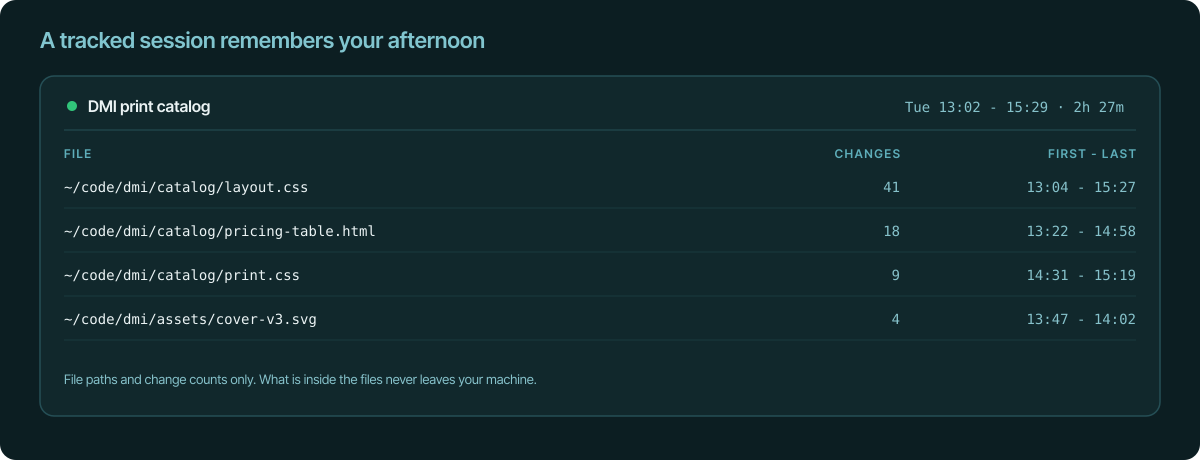
This flips recovery from reconstruction into reading. And it holds up
later, too: when a client asks what the four hours on the 26th were, the
answer is a list of files with timestamps, not a shrug. The breaks are
already handled as well, because a session closes on its own after
fifteen minutes without activity (you can change the timeout), so your
lunch was never counted in the first place.
Bill it like any other time
Recovered sessions are ordinary sessions. They show up in your reports,
they count as unbilled time, and they flow onto your next invoice with
everything else. Nothing about them is marked as second-class, because
nothing about them is second-class: they are your work, written down a
few days late.
Two habits keep it clean. If a meaningful share of an invoice was
reconstructed, say so in a sentence when you send it. Clients are fine
with "rebuilt from commit history", and being told beats wondering. And
keep the round-down rule from step one. The goal is a bill you can stand
behind, not a perfect one.
The shortcut: say it instead of clicking it
If you have connected an AI assistant to your account, recovery is one
sentence: "log 13:00 to 16:30 last Tuesday on the DMI print catalog". The
assistant creates the session with exactly those times, and it appears on
your calendar like any other. How to set that up is on the
AI time tracking page.
Make this the last time
Everything above is triage. It works, but the durable fix is to stop
producing holes: tracking that starts when you start, with no timer to
forget. The first save in a project folder opens the session, the idle
timeout closes it, and invoice day becomes a review instead of an
archaeology dig. That is its own story,
and it is the reason recovery slowly becomes a skill you no longer need.
Until then: open last week, find the holes, and go get your hours back.
They are worth real money, and the evidence is still warm.