
Two ways to call tracking "automatic"
Automatic time tracking comes in two flavours, and they're almost opposites.
The first watches the artifacts of work you pointed it at: the files you
save in a project's folder, the URLs you open for a client's app. Each event is
a structured signal — this file, in this folder, at this time.
The second watches everything you do — screenshots, the active window, often
keystrokes — and feeds it to a model that guesses which project it was.
That's the setup sold today as "AI time tracking": monitor the whole machine,
let the AI sort it out.
Both save you from a stopwatch. But almost every real advantage comes down to
one difference — a known fact versus a model's best guess — and it shows up
in your bill, your privacy, and what you can defend later. That difference is
the bet behind the best automatic time tracker: you
shouldn't have to surveil yourself to fill a timesheet.
A lookup, not a guess
When you save ~/work/clientA/checkout.ts, the project is Client A. Not
71% likely — certain, because that path lives in Client A's folder. It's a
lookup. The same input always gives the same answer, and there's nothing to
review.
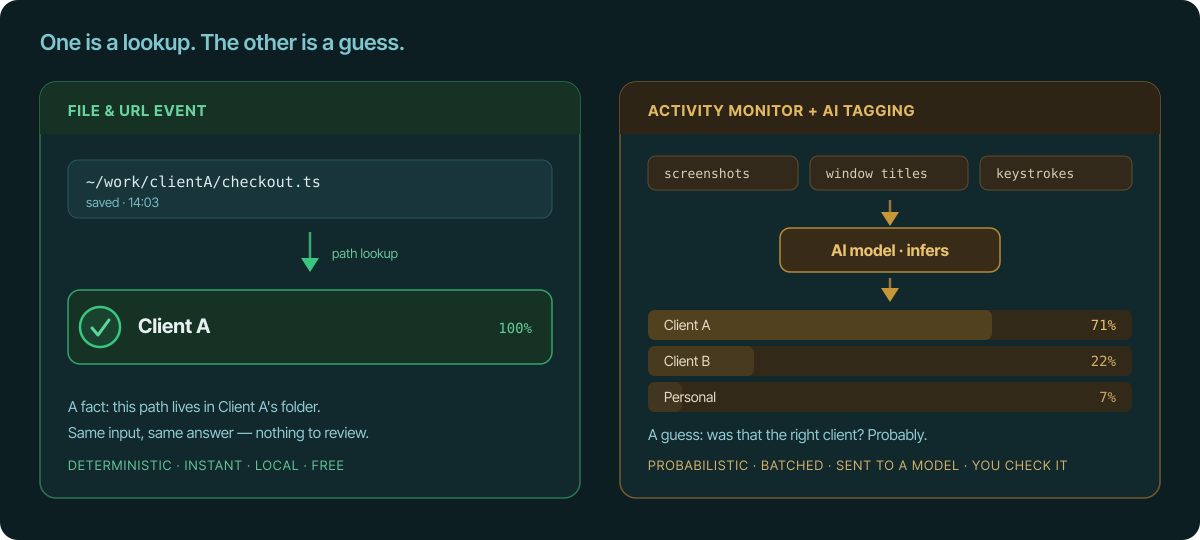
AI tagging infers the project from window titles, on-screen text, or
screenshots. It's a guess, and it's wrong often enough to matter — most on the
ambiguous cases that matter most: two clients on the same stack, or generic
tools like the terminal, your email, or Slack, where nothing on screen says
which client you were serving. Deterministic paths are also what let you
split hours cleanly across clients
that an app-level log lumps together.
This is where billing turns the difference from academic into money. A
misattributed hour is either revenue you lost or an overbill that quietly costs
you a client's trust. When they ask "why three hours on us?", "these files in
your repo were saved in this window" is an answer; "the model was fairly sure"
is a liability. (For the broader version of this argument — app and activity
monitors in general — see
file changes vs. activity monitors.)
Accuracy you pay for in surveillance
Here's the catch nobody mentions: AI tagging is only as good as what it's
allowed to see. To tag accurately, the model needs rich input — screenshots
every few minutes, the active window's text, sometimes your keystrokes. Accuracy
and intrusiveness are bolted together: the better you want the guess, the more
of your screen it has to read.
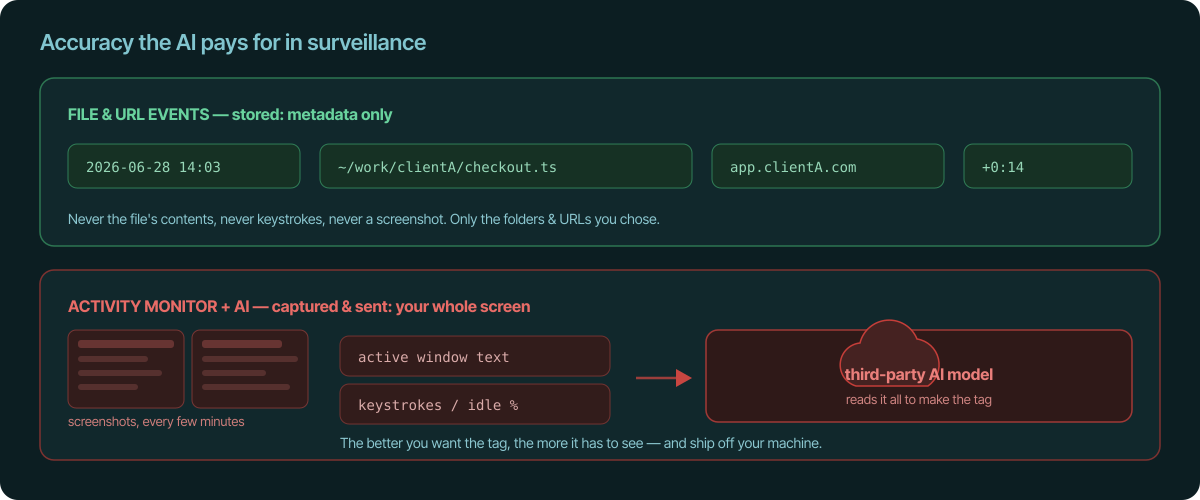
File and URL events store the opposite: a timestamp and which file or URL —
never the file's contents, never what you typed, never a picture of your screen.
If you want the exact list, we publish
what Temporal.ist sends to the server,
and the app takes no screenshots and no keystroke logging
on any plan.
For anyone under an NDA — most freelancers — the difference is stark. A capture
stream sweeps up Client B's screen while you're billing Client A, and usually
ships all of it to a third-party model to be read. Tracking only the folders and
domains you chose is private by design, not by policy.
An invoice line you can defend
Because the signal is concrete, the whole chain stays auditable. File and URL
events roll up into a session, and the session
becomes an invoice line item — and you can walk it
backwards the whole way.
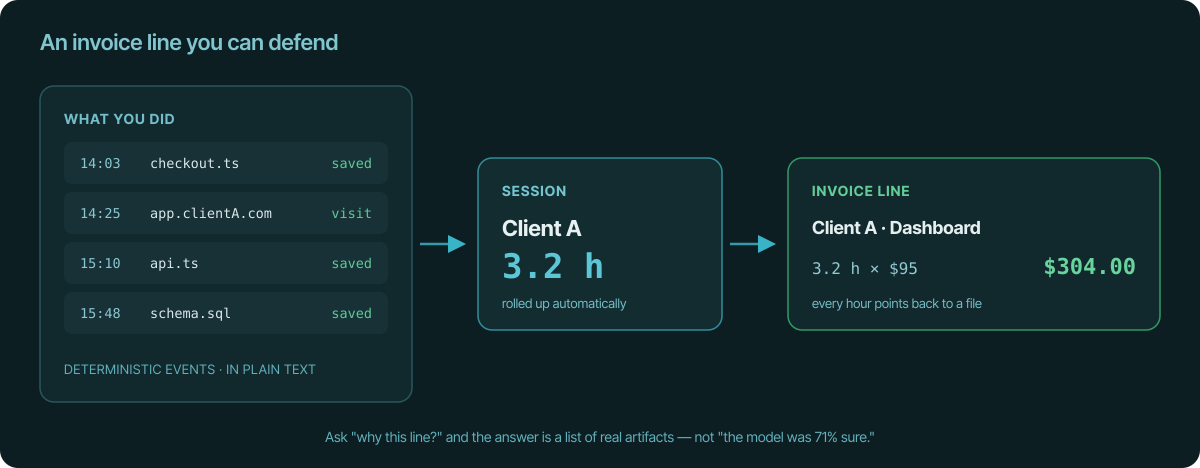
Ask "why is this line 3.2 hours?" and the answer is a list of real artifacts —
the files you saved, the pages you opened, with timestamps. Sessions are
editable drafts you review before billing, so when something's off you fix the
record in plain sight. An AI-tagged log gives you a category and a confidence
score; to "correct" it you argue with a model, and you can't audit why it
decided what it did. One is evidence. The other is "trust me."
The costs you don't see on the label
Determinism is also just cheaper and sturdier:
- No inference bill, no latency. Path matching is instant, local, and free.
AI tagging is a recurring compute cost and usually happens after the fact, in
batches — so your day's record isn't ready when your day is. - No model in your critical path. Your billing shouldn't depend on a model
provider's uptime, pricing, or deprecation schedule. A folder rule doesn't get
discontinued. - It works offline. The desktop client matches locally and syncs later; AI
tagging generally has to phone home. - Less to maintain. Point it at a folder and a few URL patterns and you're
done. AI tagging adds a capture agent, a model pipeline, category tuning, and
a steady stream of misclassifications to fix — and the ambiguity grows as
your projects multiply and start to overlap.
The honest exception
There's one thing capture-everything does that file and URL events can't: it
notices work that touches no file and no tab — a phone call, a meeting, time at
a whiteboard.
That gap is real, but the fix isn't to surveil 100% of your screen to recover
the 10% the files missed. You don't film the whole room to catch what the
camera didn't. A quick note or a session you add by hand
covers it deterministically, in seconds, without a model reading anything. The
trade — total surveillance for a sliver of auto-capture — is a bad bargain.
The takeaway
"Let an AI figure out what you worked on" sounds effortless, but you pay for it
in capture, correction, and a record you can't fully defend. Tracking the files
you save and the URLs you open is less magical and far more honest: a lookup
instead of a guess, metadata instead of your screen, and an invoice where every
hour points back to something real. That's the kind of automatic worth trusting
with a client's bill.
See also
- file changes vs. activity monitors — the broader case against app and activity monitors.
- what Temporal.ist sends to the server — the full list: timestamps and file/URL names, nothing more.
- track time across multiple clients — why deterministic paths split client hours that app logs can't.
- automatic time tracking — the timesheet that writes itself from your work.
- a time tracker without timers — tracking runs in the background; no stopwatch, no AI guesswork.