
If you're hesitant, you're our kind of user
"Automatic time tracking" is a phrase that should make you suspicious. In this
category it often means screenshots every few minutes, keystroke counts, and a
productivity score — software you point at yourself that you'd never let anyone
else run. If that's why you've been holding off, good. You should know exactly
what a tool sends home before you install it.
So here it is, in full. Not "we respect your privacy" — the actual fields. This
is everything the desktop client and the browser extension transmit to our
servers, and everything they don't.
The desktop client, field by field
The desktop client watches the folders you choose and turns file activity into
sessions. Here is the complete request body it sends — there is no second,
hidden payload.
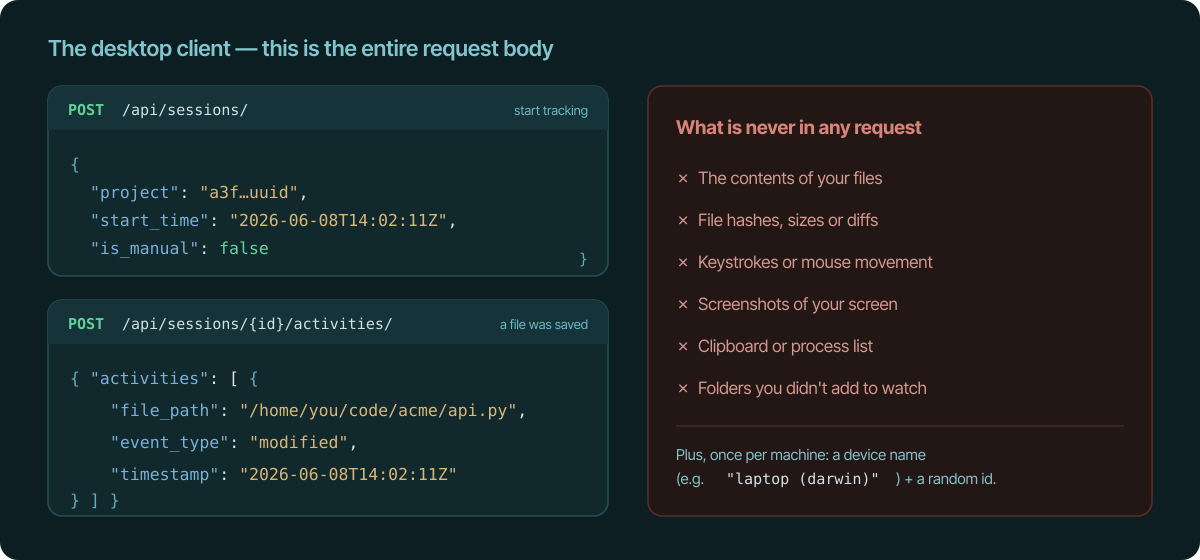
When a session starts, we receive the project, a start time, and
whether you started it by hand (is_manual). When you save a file in a watched
folder, we receive one activity: the file path, the event type
(created, modified, deleted, moved), and a timestamp. Closing a
session is an empty request; pausing sends only the session id and the word
pause or resume.
Let's be straight about the one field that can feel sensitive: file_path is
the real path of the file you saved — for example
/home/you/code/dmi/api.py. That's the name and location of a file, which
is what lets the app group your work and show you what you did. It is never
the file's contents — we don't open, read, hash, diff, or upload the file
itself. And you decide which folders are watched in the first place, with
exclude rules for anything you don't want seen (node_modules/, .env, a
private directory). Nothing outside the folders you add is ever looked at.
The only other thing the client sends, once per machine, is a device name so
you can tell your laptop from your desktop — your computer's hostname plus its
OS, like laptop (darwin) — and a random identifier. You sign in through the
website with OAuth (PKCE); the client never sees or sends your password.
The browser extension only acts on the sites you list
This is the part people worry about most, so let's be unambiguous: the
extension works from an allowlist. It does nothing on any website until
you add a URL pattern for it. The patterns you save — for example
github.com/dmi-co/* — are the only URLs it ever acts on. Every other
site you visit is ignored.
That's the opposite of "watch everything and figure it out later." There is no
default list, no catch-all, no background crawl of your tabs. An empty pattern
list means the extension tracks nothing at all.
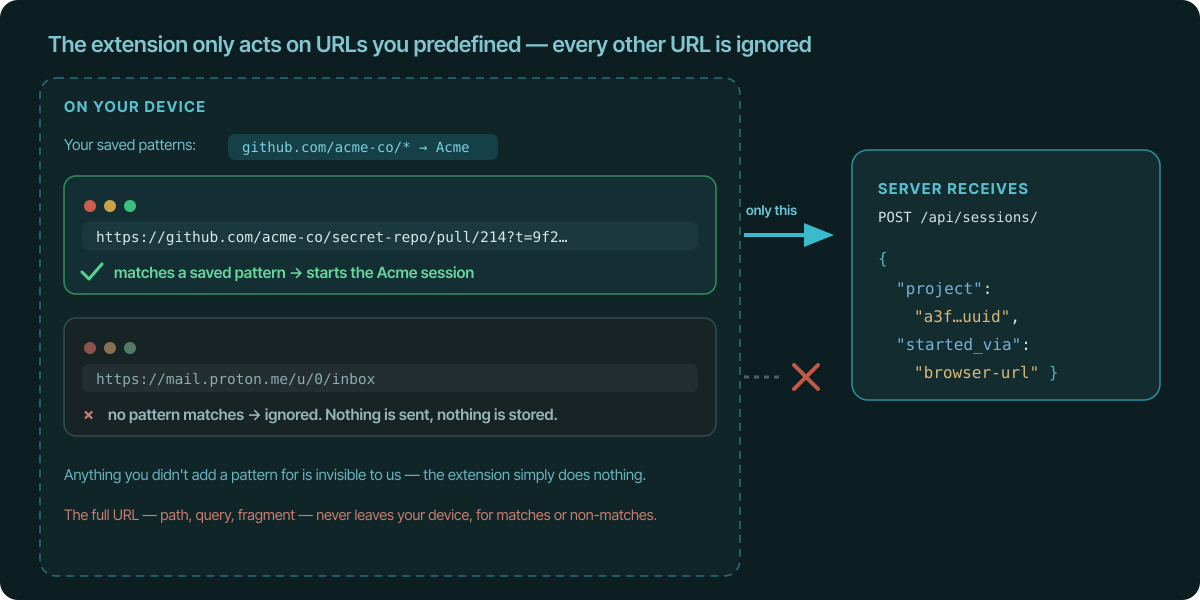
Here's what happens for any tab, on your machine:
- The URL matches one of your patterns → a session starts for that project,
and the only thing that leaves your browser is the matched project id and
started_via: "browser-url". - The URL matches none of your patterns → nothing happens. It isn't sent
anywhere and it isn't logged. Your bank, your personal email, the thing you
googled at lunch — if you never added a pattern for it, the extension does
nothing with it. It's effectively blind to everything you didn't list.
Either way, the full URL — the domain, the path, the query string, the fragment
— never appears in any request body, any server log, or any database. We
couldn't show you your own browsing history if we wanted to, because we never
received it. (Stopping and pausing sessions, like the desktop client, send only
ids.)
A fair question: to compare a tab against your patterns, the extension does
read the current tab's URL — that's true of any extension that reacts to which
site you're on. The point is what happens next. The reading is local, the
comparison is local, only matches are ever transmitted, and non-matches are
dropped on the spot. The extension has no content script, so it never reads the
contents of any page; and out of the box it can only talk to temporal.ist,
requesting deeper access to a site only when you add that site's pattern.
What we never receive — from either client
- Your file contents. Paths and names, never what's inside the files.
- Your browsing URLs or history. Matched locally; only a project id leaves.
- Screenshots. There is no screen-capture code anywhere in either client.
- Keystrokes or mouse movement. We don't hook input devices.
- Page contents. The extension has no content script; it never reads the
DOM of any page you visit. - Clipboard, process lists, network traffic, or files outside your watched
folders. None of it is touched.
There's no productivity score either. We don't grade you, because the data to
grade you was never collected.
Don't take our word for it — verify it
The best part of a minimal design is that you can check it:
- Watch the traffic. Open your browser's network inspector, or run the
desktop client behind a local proxy, and read the requests yourself. They'll
match exactly what's above. - Read the activity feed. The app shows the literal file paths and the
per-project sessions it recorded — the same data we received, nothing
reshaped behind the scenes. - It's local-first. The desktop client stores activity in a local SQLite
database on your machine and syncs sessions from there, so it keeps working
offline and you can inspect what it holds.
Your work, your call
You choose the folders. You choose the URL patterns. Everything is captured on
your device first, only the minimal session data is synced, and you can delete
it whenever you like. We built an automatic tracker for people who are
allergic to surveillance — because we are too.
If the precise version of "automatic" above sounds like something you can live
with, that's the whole pitch. Give it a try, watch the requests for yourself,
and turn it off in one click if it isn't for you.
See also
- time tracking without screenshots — Log accurate hours without monitoring or screenshots.
- file changes vs activity monitors — Why file-change tracking beats app and activity monitoring.
- what is Temporal.ist — Automatic, privacy-first time tracking explained.
- automatic time tracking for developers — Tracks file changes in any editor, no plugin needed.
- an automatic time tracker without timers — Capture hours automatically, no stopwatch required.