
The problem with editor plugins
Search "time tracking for developers" and you mostly find editor extensions:
one for VS Code, a different one for JetBrains, nothing for your Neovim setup,
and certainly nothing for the ssh session where half your real work happens.
Each one is a separate plugin to install, keep updated, and trust inside your
editor — and the moment you switch tools, your tracking history fragments.
There's a simpler place to watch from: the filesystem. Whatever editor you use,
when you save a file it produces an ordinary write event. Track that and the
editor stops mattering.
How it works: watch files, not the editor
A background desktop client (macOS, Windows, Linux) watches the directories you
configure. When a file changes inside one, a session for that project starts;
when edits stop for a while, it ends. Because it's reading filesystem events,
the same setup covers every editor you'll ever use.
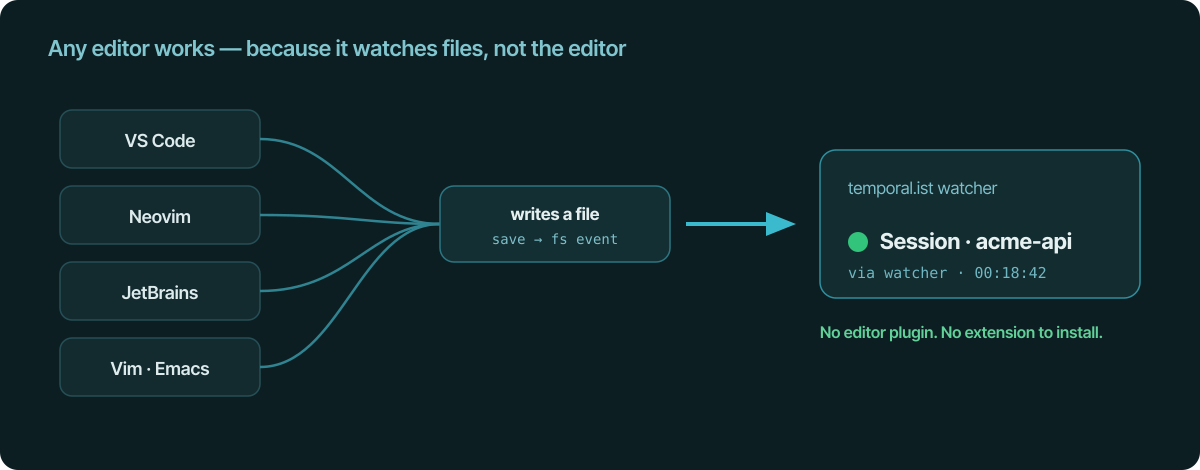
No extension in VS Code. No plugin in JetBrains. Nothing to wire into Neovim.
If your editor can save a file, it's already compatible.
Setting up a project
You map each project to a directory once, and tell the watcher what counts:
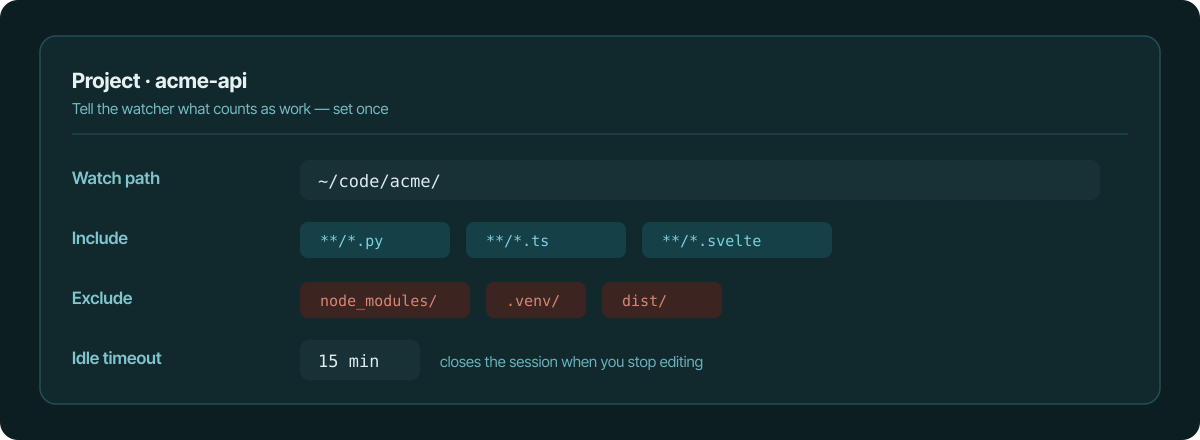
- Watch path — the repo to track, e.g.
~/code/dmi/. - Include — globs that count as work:
**/*.py,**/*.ts,**/*.svelte. - Exclude — noise to ignore:
node_modules/,.venv/,dist/. This
matters more than it sounds — a test run ornpm installwrites hundreds of
files you don't want inflating your hours. - Idle timeout — how long with no in-scope edits before the session
auto-closes (default 15 minutes), so breaks and lunches aren't tracked.
It follows you to the terminal
A lot of developer work isn't in a GUI editor at all — it's in a terminal,
often on a remote box. The same tracking is available as a Linux CLI and
TUI that installs over plain SSH, signs in with the OAuth device flow, and
runs the watcher as a systemd service. So work on a headless VPS lands in the
same place as work in your desktop editor, each session tagged with where it
came from.
What it doesn't do
- No screenshots, no keystroke logging, no productivity score. Capture is
file paths (and, via the browser extensions, visited URLs) — all auditable
in plain text. - No editor lock-in. Switch from VS Code to Neovim tomorrow and your
tracking doesn't notice or care. - No manual timer babysitting. A manual timer exists as a fallback, but the
default is that you never touch it.
From edits to an invoice
Because each project links to a client and a rate, the sessions your edits
generate become invoice line items in the same tool — no export step. You write
code in whatever editor you like; the billable hours assemble themselves.
The takeaway
A developer time tracker shouldn't care which editor you use. Watch the files
instead of the editor, exclude the build noise, let idle time trim the breaks,
and the same setup covers VS Code, Neovim, JetBrains, and the terminal on your
VPS — with nothing to install in any of them.
See also
- file-change time tracking — Why file changes beat app and activity monitors.
- Linux time tracking app — Desktop tray plus headless CLI for servers and SSH.
- automatic billable hours — Capture billable time from edits, no stopwatch needed.
- automatic time tracking — The timesheet that writes itself from your work.
- a time tracker without timers — Ditch the stopwatch; tracking runs in the background.