
"Automated" hides two very different mechanisms
Every tool on this page calls itself "automatic." None of them make you press
a stopwatch. But there are really only two ways software can start and
categorize a session without you touching a timer, and which one a tool uses
matters more than most comparisons let on:
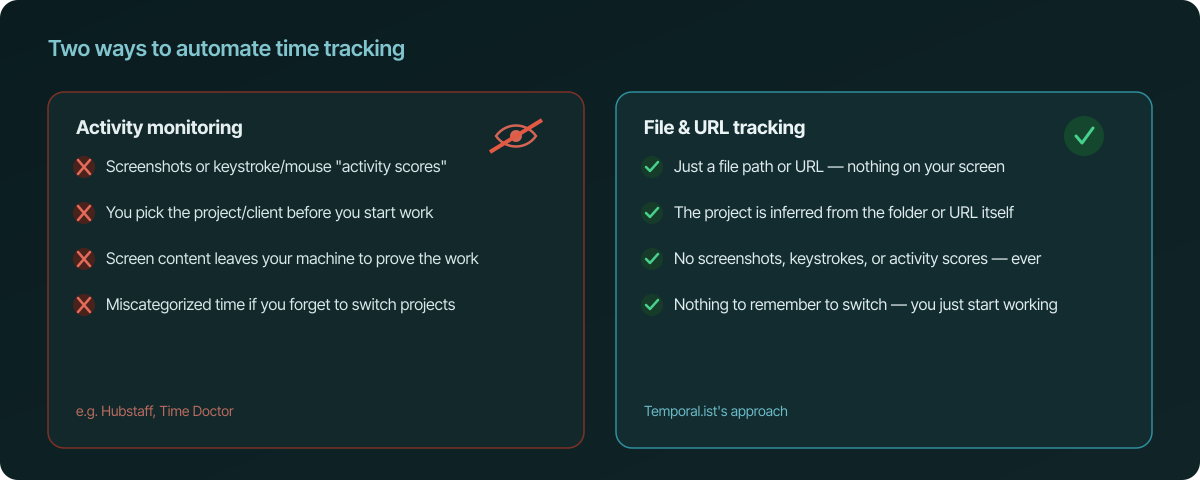
- Activity monitoring watches which app, window, or website has focus —
and some tools go further and take periodic screenshots or compute a
keystroke/mouse "activity score" to prove you were working. - File- and URL-based tracking watches what you actually touched — a
file save, a visited URL — and uses that fact itself as both the timestamp
and the project label.
That distinction drives almost everything else in this comparison: privacy,
setup effort, and whether you ever have to stop and manually file a chunk of
time against a project.
The quick answer
| Tool | Tracking method | Privacy | Platforms | Starting price |
|---|---|---|---|---|
| Temporal.ist | File saves & visited URLs | No screenshots, keystrokes, or activity scores — ever | Windows, macOS, Linux, Linux CLI, Chrome/Edge/Firefox/Safari | Free (early access) |
| Toggl Track | Manual timer + app/URL detection | No screenshots | Windows, macOS, Linux, mobile, browser | Free (up to 5 users) / $9/user/mo annual |
| Clockify | Manual timer + app/URL detection | No screenshots (screenshots opt-in from the Pro tier) | Windows, macOS, Linux, mobile, browser | Free (unlimited users) / $3.99/user/mo annual |
| RescueTime | Activity monitoring (app/site usage) | No screenshots | Windows, macOS, Linux, mobile | $7/mo annual, no free plan |
| Timing | Automatic app/document tracking | No screenshots | macOS only | ~$9/mo annual, no free plan |
| ActivityWatch | Automatic app/window tracking | No screenshots — open-source, fully local | Windows, macOS, Linux | Free forever |
| Memtime | Automatic app/document/browser tracking | No screenshots | Windows, macOS, Linux | €12/user/mo annual, no free plan |
| WakaTime | Automatic coding-time tracking (editor plugin) | No screenshots | Any editor with a WakaTime plugin | Free tier (1-week history) / $8.25/mo annual |
| Hubstaff | Activity monitoring + screenshots | Screenshots + activity levels | Windows, macOS, Linux, mobile | $4.99/user/mo annual |
| Time Doctor | Activity monitoring + screenshots | Screenshots + activity levels | Windows, macOS, Linux, mobile | $6.67/user/mo annual |
Why file- and URL-based tracking wins
Three things fall out of using file saves and URLs as the source of truth
instead of watching your screen:
You never manually tag a session to a project or client. With a timer
tool — even an "automatic" one like Toggl or Clockify — you still start (or
retroactively fix) an entry against a specific project. With file-based
tracking, the folder you're saving in or the domain you're visiting is the
project label, so attribution happens for free, at the moment you start
working, with nothing to remember and nothing to get wrong.
There's nothing left to capture privately. Activity monitors need to see
which app or window has focus to guess context; screenshot tools go further
and record your actual screen. File and URL tracking doesn't need any of
that — the file path or URL already tells you everything required to bill
accurately, so there's no screen content, no keystrokes, and no "activity
score" left to log in the first place. It's not a privacy policy promising
restraint; the mechanism simply doesn't collect it.
A save event is a fact, not an estimate. "Activity score" metrics are
inferred from keyboard/mouse cadence — a fuzzy number that can undercount
careful, low-motion work (reading a spec, thinking through a bug) and can be
inflated by jiggling a mouse. A file save either happened or it didn't. It's
a cleaner signal precisely because it isn't trying to measure effort, only
record what you touched and when.
The ten tools, one by one
1. Temporal.ist — best for privacy, multi-platform coverage, and price
Tracks file saves and visited URLs automatically, with no screenshots,
keystroke logging, or activity scoring at any point. Covers desktop
(Windows, macOS, Linux), a headless Linux CLI for servers, and browser
extensions for Chrome, Edge, Firefox, and Safari — a wider platform spread
than anything else on this list. Tracked sessions roll straight into
invoicing with per-client rates, so billing doesn't require a second tool.
Free during early access.
2. Toggl Track
A general-purpose, widely used tracker built around a timer — automatic
app/URL detection can suggest an entry, but the core loop is still starting
and assigning a timer. Free for up to 5 users; paid plans start around
$9/user/month billed annually. No screenshots on any plan. Available on
Windows, macOS, Linux, mobile, and browser.
Read more: Temporal.ist vs. Toggl Track ·
Toggl Track alternatives
3. Clockify
Hard to beat on headline price — the free plan supports unlimited users.
Tracking is timer-first like Toggl; paid tiers (from $3.99/user/month billed
annually) add reporting and administration, and screenshots become available
as an opt-in starting on the Pro tier. Windows, macOS, Linux, mobile,
browser.
Read more: Temporal.ist vs. Clockify ·
Clockify alternatives
4. RescueTime
A genuine activity-monitoring tool: it watches which apps and sites you use
and scores how "productive" that time was, with no per-project tagging
required — but also no client/project structure or invoicing. No free plan;
Solo starts at $7/month billed annually. No screenshots. Windows, macOS,
Linux, mobile.
Read more: Temporal.ist vs. RescueTime ·
RescueTime alternatives
5. Timing
An automatic app- and document-level tracker popular with Mac-only
freelancers for its granular per-document breakdown. macOS only — the
biggest limitation versus any cross-platform option here. No free plan,
starting around $9/month billed annually. No screenshots.
Read more: Temporal.ist vs. Timing ·
Timing alternatives
6. ActivityWatch
Free, open-source, and fully local — arguably the strongest privacy story on
this list, since nothing ever leaves your machine at all. The trade-off is
that it's a personal analytics tool rather than a billing one: no
invoicing, no client/project structure, and you're responsible for your own
hosting or sync across devices. Windows, macOS, Linux.
Read more: ActivityWatch alternatives
7. Memtime
Automatic tracking of time spent per app, document, and browser tab, aimed
at consultancies that need detailed retrospective timesheets. No
screenshots, but also no built-in invoicing. No free plan; starts around
€12/user/month billed annually. Windows, macOS, Linux.
Read more: Temporal.ist vs. Memtime ·
Memtime alternatives
8. WakaTime
Purpose-built for coding time specifically, via editor plugins for VS Code,
JetBrains, Vim, and others. Excellent if the only thing you want tracked is
time spent writing code; it has nothing to say about meetings, design work,
or anything outside an editor. Free tier keeps a week of history; paid plans
start around $8.25/month billed annually. No screenshots.
Read more: Temporal.ist vs. WakaTime ·
WakaTime alternatives
9. Hubstaff
Built for managing outsourced or remote teams: activity levels plus optional
screenshots at intervals, with GPS tracking for field teams. If a business
genuinely needs proof-of-work screenshots for contractor oversight, Hubstaff
does that job directly — it's the most surveillance-oriented tool on this
list by design. Starts at $4.99/user/month billed annually. Windows, macOS,
Linux, mobile.
Read more: Temporal.ist vs. Hubstaff ·
Hubstaff alternatives
10. Time Doctor
Similar positioning to Hubstaff — activity monitoring with screenshots —
aimed at agencies that want more oversight of remote or outsourced staff
than a plain timer provides. Starts at $6.67/user/month billed annually.
Windows, macOS, Linux, mobile.
Read more: Temporal.ist vs. Time Doctor ·
Time Doctor alternatives
Which one should you actually pick
If you bill by the hour and want accurate time with the least possible
privacy trade-off, file- and URL-based tracking is the better mechanism, and
Temporal.ist covers the most platforms of the tools that use it, at no cost
during early access. If you specifically want a fully local, open-source
tool and don't need invoicing, ActivityWatch is a strong, honest choice. If
all you need is coding time, WakaTime is the more precise tool for that one
job. And if the actual requirement is proof-of-work screenshots for
contractor oversight, that's what Hubstaff and Time Doctor are built for —
just recognize that's a different product decision than "automatic," it's a
decision to monitor.
The takeaway
Two mechanisms hide behind the word "automatic": watching your screen, or
watching what you touched. File and URL tracking gets you accurate,
automatically-attributed hours without screenshots, keystrokes, or activity
scores — because the file path or the URL already is the evidence. That's
the case for Temporal.ist over the activity-monitoring tools on this list,
and it's why it's ranked first here.